DuckDB 2.0 as a Pipeline Engine
In my circles at least, DuckDB seems to be mostly understood as either an SQLite equivalent for analytical queries, or as an equivalent to pandas but somehow more suited to handling SQL. It's rarely mentioned in the same breath as Spark or other 'real' data processing engines, and if it is, always with the addendum that it's 'for small to medium sized data'.
I think this is underselling it. With version 2.0, released on 21 October, I think DuckDB has become among the best of the engines available for batch data pipelines for any realistic data size, up to at least a terabyte. This is especially the case if truly enormous data is handled in the only sane way: incrementally. In this post I compare DuckDB 2.0 with two leading engines: Spark and StarRocks. Then I show how Duckstring's incremental runs compare against this baseline.
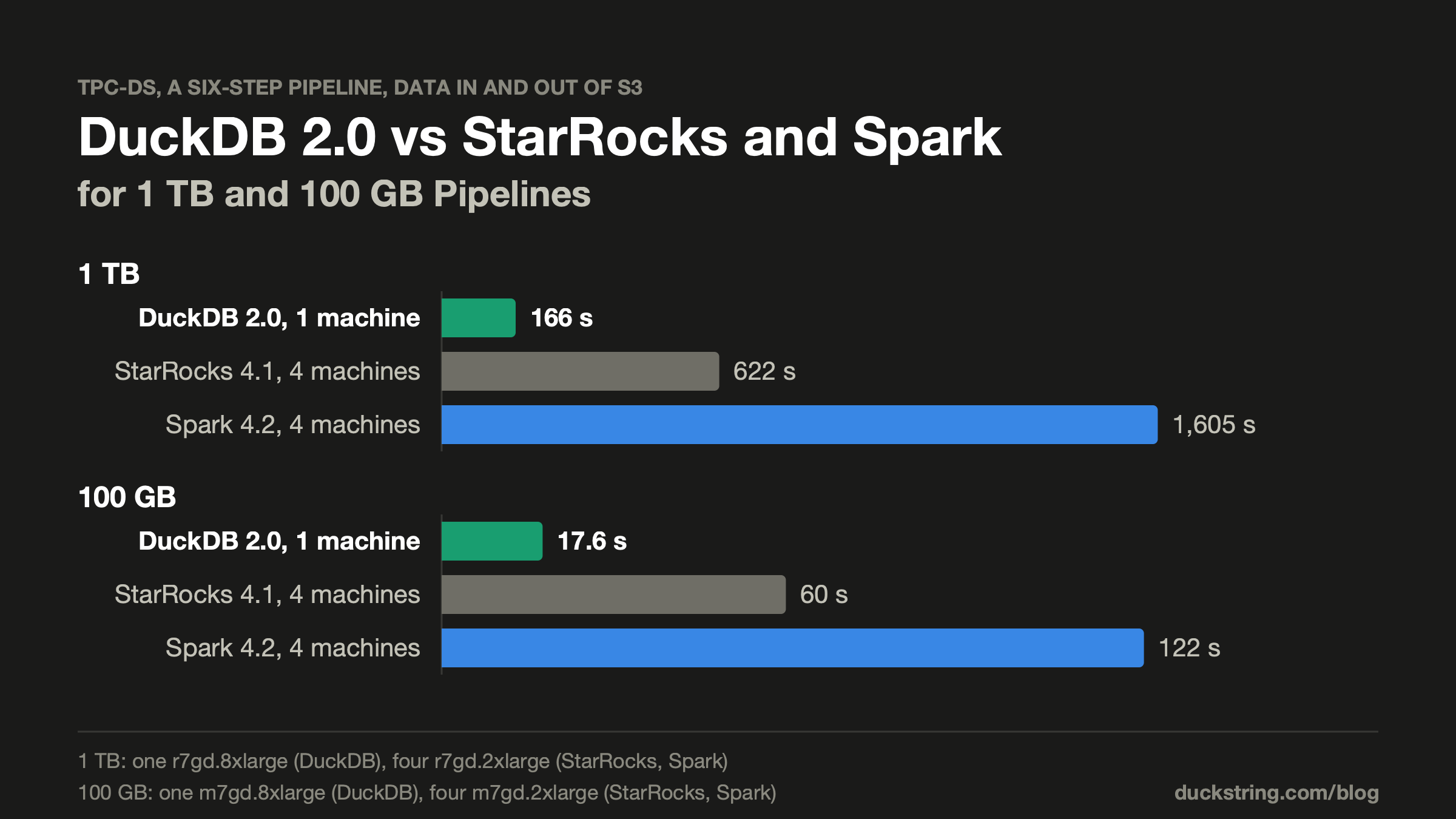
In short, the tests confirmed that one DuckDB machine beat same-sized Spark and StarRocks clusters, at both 100 GB and 1 TB scales, by between 3 and 10 times. The 100 GB pipeline (which I suspect is already bigger than most real-world data pipelines) ran comfortably on my 32 GB laptop in less than 30 seconds. For Duckstring's incremental workloads (sub-1% changes per pass) this was cut dramatically again, by up to 13 times.
Testing setup
For the test, I am intentionally emulating a very common processing pattern, in which all data is in object storage (e.g. S3). A data processing step is then a read from object storage, computation, and subsequent write back to object storage. This is of course not optimal for performance, but it is very common, practical and flexible, so I believe it is the scenario that is of most value to understand deeply.
The example pipeline is intended to emulate the sort of thing many data teams would run each day: a large fact table enriched with its dimensions, then aggregated for reporting. It has six steps:
Pipeline Structure

An example pipeline meant to emulate a common data transformation process.
The data is TPC-DS at SF100 and SF1000 (100 GB and 1 TB), where the sales fact has 269 million and 2.7 billion rows, respectively. Each test ran a rebuild of every table, reading every source in full and computing joins and aggregates from scratch, with no local cache between runs.
Three engines were tested, each running the entire pipeline as one SQL script:
- DuckDB 2.0: Single node only
- Spark 4.2: Single node, and an equal-sized cluster
- StarRocks 4.1.6: Single node, and an equal-sized cluster
Then, as a test of Duckstring's performance, the pipeline was run as it would be typically: a first pass to build the initial table state, then incremental runs with around 0.5% of sales records changed, under a few scenarios:
- New sales only (append)
- Updates and deletes to sales, and new returns
- Same, but also with updates to items and customers
The single node tests were done both on my laptop (32 GB MacBook Air), for SF100 only, and on AWS for both SF100 and SF1000.
The hardware for the AWS tests was such that the four nodes in each cluster matched the cost of their single node equivalent:
- Single node 100 GB: m7gd.8xlarge
- Four node 100 GB: m7gd.2xlarge
- Single node 1 TB: r7gd.8xlarge
- Four node 1 TB: r7gd.2xlarge
I intentionally ran each case with no tuning to the engines, to compare 'out of box' performance. It's likely that each engine could perform better with adjustment, but I wanted to emulate the first experience a new user would see before fine-tuning.
Results
On a laptop
It's pretty convenient being able to test on a laptop, and I suspect it's what most of you would want to try to replicate. Here's the result:
100 GB on a MacBook Air

Run times on a laptop for TPC-DS at 100 GB.
This is exactly what DuckDB was built for, so it's no surprise that DuckDB crushed it. I don't think anyone is running Spark on their laptop! Note that StarRocks here had to run on a VM, as it requires Linux.
Still, I was quite stunned at how effortlessly it managed 100 GB, where I would have assumed my 32 GB RAM would have limited it. DuckDB streams the data it is processing, so it holds very little in memory, peaking in these tests at 3 GB.
On a cluster
100 GB
I've included here both the single node and four node cluster results for each engine (DuckDB only on single node), where the four node cluster is sized to the same cost as the single node:
100 GB on AWS

Run times on a cluster for TPC-DS at 100 GB. Single node: m7gd.8xlarge. Four node: 4x m7gd.2xlarge.
DuckDB took 17.6 seconds. StarRocks, a distributed analytics engine built for exactly this kind of query (though admittedly generally suggesting to cache its data), took about 60, and Spark about two minutes. Note that the 4 machine case took slightly longer for Spark because of the overhead in distributing and the shuffle between nodes.
So again, DuckDB is a clear winner.
This might be a surprise to many readers. To understand, it's necessary to look into two main tasks required for each run:
- Reading and writing from S3
- The computation itself
The reality is that at this scale, the S3 I/O is a real bottleneck, and how well each engine reads S3 goes a long way to explaining the times. Here's how they compare:
Peak read rate from S3

Peak read rates from S3 during each rebuild, compared to the rated bandwidth (dashed).
AWS rates the single machine at 15 Gbit/s. The four smaller machines sustain the same 15 Gbit/s between them, and can burst together up to 60 Gbit/s for a while.
DuckDB peaked at 13 Gbit/s, close to the limit of its machine. This is the result of a significant upgrade to DuckDB with its new asynchronous I/O, as part of version 2.0. The new method keeps many requests in flight on their own threads, and measured close to a full 25 Gbit/s from S3 on a single query.
StarRocks doesn't push hard on reads straight from S3 (its cache for them is off by default), so it read much slower than the others, though it did compensate for this by computing much faster than Spark. It chewed through everything it had read pretty much immediately, leaving its CPU two-thirds to three-quarters idle.
Spark read a lot faster, but with much more overhead and shuffling than StarRocks it was overall a lot slower, and used ~50% of its CPU.
Interestingly, neither distributed engine improved much (if at all) with more machines. The four-node cluster's sustained bandwidth is the same as the single machine's, and neither engine even reached that, so splitting the work across machines never really improved the overall read rate.
1 TB
The 100 GB cases are not really considered 'big data', so a test at 1 TB (billions of sales) was necessary. At this scale I didn't bother to run Spark or StarRocks on one machine, as they would always be run distributed in practice.
1 TB on AWS

Run times on a cluster for TPC-DS at 1 TB. Single node: r7gd.8xlarge. Four node: 4x r7gd.2xlarge. Solid bar is estimated with tuning, hatched the measured run time.
DuckDB took 166 seconds, under three minutes for the whole terabyte-scale pipeline. The StarRocks cluster took about 10 minutes, and the Spark cluster about 27 minutes.
The Spark performance is possibly unfair taken at face value. By default, Spark splits its joins into 200 pieces, which is reasonable at 100 GB but too few at 1 TB. Typically, Spark is tuned to a better number, but even with this tuning it's unlikely that it would have beaten around 1,000 seconds (and very unlikely to beat StarRocks). Still, this is out of the box, and might very well be how many are running Spark in reality.
DuckDB peaked at about 110 GB of memory on its 256 GB machine, never needing to spill to disk.
Given the size equivalence of the single and four node clusters, times directly translate to cost. At on-demand prices, DuckDB's terabyte run cost 10 cents, StarRocks' 38 cents, and Spark's around a dollar.
Incremental
Everything so far has compared rebuilds of the entire tables. Ideally, only the changes are processed, saving most of the work. This is what Duckstring, and especially its Trickle framework, is all about.
In each of these scenarios, only 0.5% of the large sales table has changed, so the ideal would be for an incremental process to run at 1/200 the time of the full rebuild. In practice this is never met, as even small changes to one table still require interacting with the other (large) tables, and often a small set of changes still requires recomputing many aggregation groups. Also, cases with mixtures of changes, especially including updates and deletes, require a lot more work to calculate what has changed in the result since the last run, and are much less efficient again.
These tests consider three scenarios:
- New sales: Only sales changes, strictly new. This is a classic fact-streaming case, and should approach the ideal.
- Fact changes: Updates and deletes in sales, and new returns. Quite a lot more complex, but still most tables are unchanged.
- Mixed: Same, but with updates in items and customers also. Effectively the worst case.
Incremental times on Duckstring

Run times on one AWS machine (m7gd.8xlarge at 100 GB, r7gd.8xlarge at 1 TB) using Duckstring merge tables, for 0.5% changes.
Each of the rebuilds in each scenario are roughly the same duration, as the total data volume and shape is nearly identical. The incremental cases improved run times dramatically, with every scenario beating a full rebuild by more than half.
The worst-case 'Mixed' scenario runs for less than half of a full rebuild at 100 GB, and less than one quarter at 1 TB. At this larger scale, Duckstring's overhead is a lower proportion of the total, so the incremental approach pays off mostly for larger tasks.
The 'Fact changes' scenario is comparable at ~30% and ~15% of the full rebuild for the 100 GB and 1 TB scales, respectively. When there are any multi-sided changes at all (especially with updates and deletes), much of the same work in comparing some parts against the full history of both sides is required. Essentially, if changes are in more than one source or include updates/deletes, the cost of incrementality increases heavily.
The 'New sales' case is potentially the most interesting, as it is a very common occurrence in data pipelines: one large fact table that grows progressively over time with no updates or deletes (a 'streaming table'), and a variety of dimension tables that rarely (if ever) change. Duckstring handles these specifically, first quickly detecting that no updates or deletes have occurred, and then that no other table has changed. That allows it to skip most of the overhead and guarantee that the results are both new and unique, allowing them to be simply appended.
At 100 GB there is still per-task overhead driving a lot of total time, with the total run time at 25% that of a full rebuild. However, at the larger scale this makes up much less of the total, and the run time is less than 10% of a full rebuild, running in less than 15 seconds at a terabyte scale.
Time per step in each change

Each bar runs from a step starting to its output being published (the darker end), labelled with its time. Green is DuckDB's rebuild of the mixed scenario, stage by stage. 100 GB: the median of three runs; 1 TB: one run.
Here we can see a breakdown of total times spent per task for each scenario. For the incremental processes, the initial reads
of sales_feed and dimensions take some time (vs. being absorbed into the join stage in the rebuild), as this is where changes are first identified. This can make up a fairly significant proportion of the total task time, taking around a quarter of the total for the 'Mixed' scenario in the 100 GB case.
The most complex part of the pipeline is the sales_enriched step. Its duration depends heavily on whether there were updates or deletes and how many dimensions changed, so for the 'Mixed' scenario it is the longest step by far. In the 'New sales' scenario it is detected as an append-style change and accelerated dramatically, though it does still require a join across all of the large dimension tables, so it is not instantaneous.
The customer_value step aggregates across many customers and is much less able to skip work for any of the change types, so it remains a significant proportion of total time for each.
Speedup per step against the rebuild

How many times faster each step absorbed the change than DuckDB's rebuild ran the same stage: solid to the multiple at 100 GB, the lighter extension to the multiple at 1 TB.
Shifting our attention to the speed up multiples per step and scenario at each scale, we can see the magnitude of benefits that incremental processing brought to each.
The benefits are heavily dependent on scale. At 1 TB in the 'New sales' scenario, the speed up relative to a rebuild for the fact-dimensions join (sales_enriched) step is dramatic at ~23x. For 100 GB it is less dramatic at ~10x.
For the complex customer_value aggregation, incremental processing is no better than a full rebuild at the 100 GB scale, and relatively little benefit at the 1 TB scale. Again, this is because much of the work needs to be repeated for each group, plus the added overhead of managing past state. Tasks like this may be better treated by flagging for full rebuild each run, depending on scale.
Peak memory against the rebuild

Peak memory use. 100 GB: the median of three runs; 1 TB: one run.
Another key benefit of incremental processing is in reducing memory requirements, which can often be the bottleneck or a major cost driver for compute. The peak memory for each scenario and scale looks very similar to that of the task durations - less than half at the 100 GB scale, and less than a quarter at the 1 TB scale.
Peak memory per step

Peak memory use. 'Full build' measured during first pass through the pipeline. 100 GB: the median of three runs; 1 TB: one run.
Broken down by task, we can't directly compare against the DuckDB rebuild, as this was executed as one overall process. Instead we compare against the first-build pass for each step in Duckstring.
For the 1 TB case, the difference in memory requirements for sales_feed (the task with the largest first-build usage) is dramatic, using less than 5% compared to the build. The customer_value step is also reduced by more than half. This can be reason alone to keep customer_value incremental, even if its improvements to process time are limited.
The small aggregates category_month and store_quarter actually require more (or at least similar, for 100 GB) memory compared to the first build. A full aggregate with only a few groups can stream through with very little memory, while the incremental process needs to also manage its previous state. These generally need relatively little memory though, so are rarely the bottleneck.
The fact-dimension sales_enriched step is very much dependent on how much has changed, using less than a quarter in the 'New sales' scenario at 1 TB, but effectively the same as a first build when all parts of the join have changed.
In Duckstring
Duckstring puts a lot of this complexity behind the scenes, so switching to incremental is not much more complicated than defining the full build. Here's the code for the customer_value table, for example:
from duckstring import agg, ripple


@ripple
def aggregate(pond):
    (
        pond.trickle("sales_enriched.enriched")
        .filter("s0.ss_customer_sk IS NOT NULL")
        .aggregate(
            by=["ss_customer_sk", "ca_state"],
            revenue=agg.sum("net_revenue"),
            purchases=agg.count(),
            last_purchase=agg.max("d_date"),
        )
        .merge("customer_value")
    )
The Trickles page explains how the changes flow, and the Playground shows an incremental join running in the browser. The Quickstart outlines how to set up a Duckstring pipeline in a few minutes.
Summary
- On a laptop, DuckDB rebuilt a 100 GB pipeline in 25 seconds, where Spark took 200.
- On AWS, one DuckDB machine beat Spark and StarRocks clusters with the same total cores and memory, by 3 to 10 times, at 100 GB and at 1 TB.
- Adding machines barely helped the clusters at these sizes: the work is mostly reading and writing storage.
- DuckDB processed a terabyte in under three minutes, with memory to spare and no tuning.
- Applied incrementally, a 0.5% change was able to run in less than half the time in the worst case, and less than 10% in the best, with similarly reduced peak memory requirements.
All in all, I'm stunned by the performance of DuckDB in these tests. I think as of the version 2.0 release, DuckDB has become one of the fastest and cheapest engines for most data preparation pipelines. Run in a micro-batch structure, as Duckstring supports, latencies for large and complex pipelines can very feasibly be kept sub-minute.
Benchmark details (summarised with Claude)
For anyone who wants to check the working. The harness, all results and every run's logs are in the benchmark directory.
Data. TPC-DS at scale factors 100 and 1,000, from the copy AWS publishes in us-east-1
(s3://redshift-downloads/TPC-DS/2.13/), converted to Parquet keeping only the columns the pipeline reads: 4.7 GB
and 47 GB. The sales fact keeps the rows with a sale date and a store, as TPC-DS's own queries do with inner joins.
Each change touches about 0.5% of the enriched sales:
| Change | 100 GB | 1 TB |
|---|---|---|
| New sales only | 1,344,948 new sales | 13,430,179 |
| Fact changes | 538,735 new, 130,336 corrected and 47,837 voided sales; 72,665 new returns | 5,371,081 / 1,300,729 / 483,725; 724,749 |
| Mixed | the fact changes, plus 97 items reclassified and 1,974 customers moved | plus 143 items and 11,757 customers |
Engines. DuckDB 2.0.0, Spark 4.2.0 (local mode on one machine, standalone on the cluster), StarRocks 4.1.6
(all-in-one on one machine; one frontend and four backends on the cluster), and Duckstring 0.7.1 on DuckDB 2.0. Each
engine ran as it ships, with no tuning and nothing cached between runs, reading its input from S3 and writing its
output to S3 (StarRocks with FILES() and INSERT INTO FILES). Each rebuild was a fresh process reading its
inputs from S3. Within one run, DuckDB keeps data it has just read from S3 in memory, so its later aggregates
re-read little of the table it wrote, which is its default behaviour; StarRocks' equivalent cache is off by default. Times run from the start of the job to the last
output written. Spark's include starting its JVM and session (about 5 seconds), and no time includes provisioning
machines or starting a cluster.
Hardware and cost. At 100 GB, one m7gd.8xlarge (32 vCPU, 128 GB) against four m7gd.2xlarge; at 1 TB, one r7gd.8xlarge (32 vCPU, 256 GB) against four r7gd.2xlarge. Each cluster costs the same per hour as its single machine (2.18 on demand in us-east-1). The laptop is a MacBook Air M4 with 10 cores and 32 GB. It has no fan, so each laptop run followed two minutes idle: the same DuckDB rebuild took 45 seconds on a warm machine and 25 on a cool one. Everything here cost about $20 to run.
All results. Median of three runs at 100 GB on AWS (within 2% of each other, except StarRocks, within 10%), one run at 1 TB:
| Change | DuckDB | Spark, 1 / 4 machines | StarRocks, 1 / 4 machines | Duckstring first build | Duckstring change |
|---|---|---|---|---|---|
| New sales, 100 GB | 16.9 s | 111 / 124 s | 65.6 / 58.5 s | 24.2 s | 4.0 s |
| Fact changes, 100 GB | 17.2 s | 111 / 122 s | 66.4 / 56.3 s | 19.3 s | 5.4 s |
| Mixed, 100 GB | 17.6 s | 111 / 122 s | 64.3 / 60.0 s | 19.7 s | 7.7 s |
| New sales, 1 TB | 166 s | not run / 1,607 s | not run / 592 s | 210 s | 12.9 s |
| Fact changes, 1 TB | 165 s | not run / 1,590 s | not run / 607 s | 163 s | 23.5 s |
| Mixed, 1 TB | 166 s | not run / 1,605 s | not run / 622 s | 162 s | 37.5 s |
On the laptop, at 100 GB: DuckDB 25 to 26 s, Spark 200 s (mixed only), Duckstring's first build 34 to 40 s and its changes 2.0, 4.3 and 7.4 s.
S3 measurements. A separate pair of runs at 100 GB, on the mixed change, recorded each machine's CPU and network traffic once a second. On one machine all network traffic is S3. On a cluster, data passed between its machines leaves one and enters another, so the cluster's total in minus its total out is its S3 reads minus its S3 writes, which separates S3 from shuffle; for both clusters that came within 0.1 GB of the same engine's single-machine run. Peak is the busiest single second. Rated bandwidth is AWS's published figure: 15 Gbit/s for the m7gd.8xlarge, and 3.75 Gbit/s sustained and 15 in bursts for each m7gd.2xlarge.
| Run | Wall | Read from S3 | Written to S3 | Between machines | Peak S3 read | CPU busy |
|---|---|---|---|---|---|---|
| DuckDB, 1 machine, from S3 | 16.8 s | 8.4 GB | 4.9 GB | none | 13.3 Gbit/s | 60% |
| DuckDB, 1 machine, from local disk | 11.3 s | none | none | none | none | 80% |
| Spark, 1 machine | 112 s | 14.2 GB | 9.8 GB | none | 8.5 Gbit/s | 53% |
| Spark, 4 machines | 123 s | about 14 GB | about 10 GB | about 22 GB | 9.2 Gbit/s | 51% |
| StarRocks, 1 machine | 60 s | 10.2 GB | 5.3 GB | none | 3.5 Gbit/s | 28% |
| StarRocks, 4 machines | 57 s | about 10 GB | about 5 GB | about 1.6 GB | 3.3 Gbit/s | 37% |
DuckDB's profiler gives the same picture from the inside: its threads spent under 2 seconds of the 17 blocked on reads, because it overlaps reading with computing, and the extra time from S3 shows up in the stages that read most from it.
Duckstring's times run from asking for fresh data until every step has finished and published its output on the machine. Duckstring then copies its storage to S3 in the background, which adds about 16 seconds to a first build at 100 GB and about three minutes at 1 TB, and about one second to a change at 100 GB and two at 1 TB. The per-step times are each step's own, from its start until its output was published on the machine; DuckDB's stage times are its own timing of each statement in the script.
Memory. Every run's whole process tree was sampled four times a second for its resident memory, by process, so each Duckstring step (which runs in its own process) is measured separately too. A change's peak is the highest sample in that change's own window, from the request until every step had published. DuckDB fills memory that's free with what it has read, so a peak is what an engine used, which can be more than it needed. Duckstring divided the machine between its steps with memory slots (four at 100 GB, six at 1 TB), each capping a step's DuckDB at its share of 80% of the machine's memory less 2 GB; with them off, the same runs took the same time and peaked at about twice the memory (140 GB against 73 for new sales at 1 TB). At 1 TB, every step's peak in a change was at most 22 GB, and the change as a whole at most 24 GB.
Fairness notes.
- StarRocks' input layout. StarRocks read one large Parquet file more slowly than many small ones: at 100 GB, splitting the fact into 256 MB files cut its time from 60 to 51 seconds. At 1 TB, StarRocks and Spark read a split copy, and DuckDB took the same time on either layout (165 to 166 seconds).
- StarRocks' schema inference was ruled out: declaring every table's schema gave the same times.
- StarRocks' cache. Its aggregates re-read the table it had just written from S3, where DuckDB keeps recently read data in memory within a run. StarRocks has a data cache, off by default for this kind of read, and it was left off: no engine carried a cache between runs, and at 100 GB StarRocks' join alone took longer than DuckDB's whole rebuild.
- Spark's shuffle partitions, as above: the default of 200 suits 100 GB and not 1 TB, where Spark's join took 18 times as long as at 100 GB for ten times the data. The tuned estimate scales its 100 GB join tenfold. Spark at 1 TB wasn't run on one machine, since nobody runs Spark that way at that size.
- Clusters were limited to the single machine's total cores by my account's quota, so scaling beyond one machine's size wasn't measured.
- Per-step speedups. DuckDB's stage times include writing each output to S3, while Duckstring's step times end when the output is published on the machine, with the copy to S3 a second or two later. That flatters Duckstring's per-step multiples slightly. Its total times end at the same point, and the copy adds the second or two given above.
Checking the answers. Every run's output was compared with DuckDB's rebuild of the same data: the aggregates row by row, to one part in a billion, and the enriched table (2.7 billion rows at 1 TB) by its row count and a sum of row hashes. All of them matched.